Mitra
A self-hosted calendar and task planner in one, with two-way CalDAV, Google Calendar, and Apple Calendar sync.
Open source alternative to:
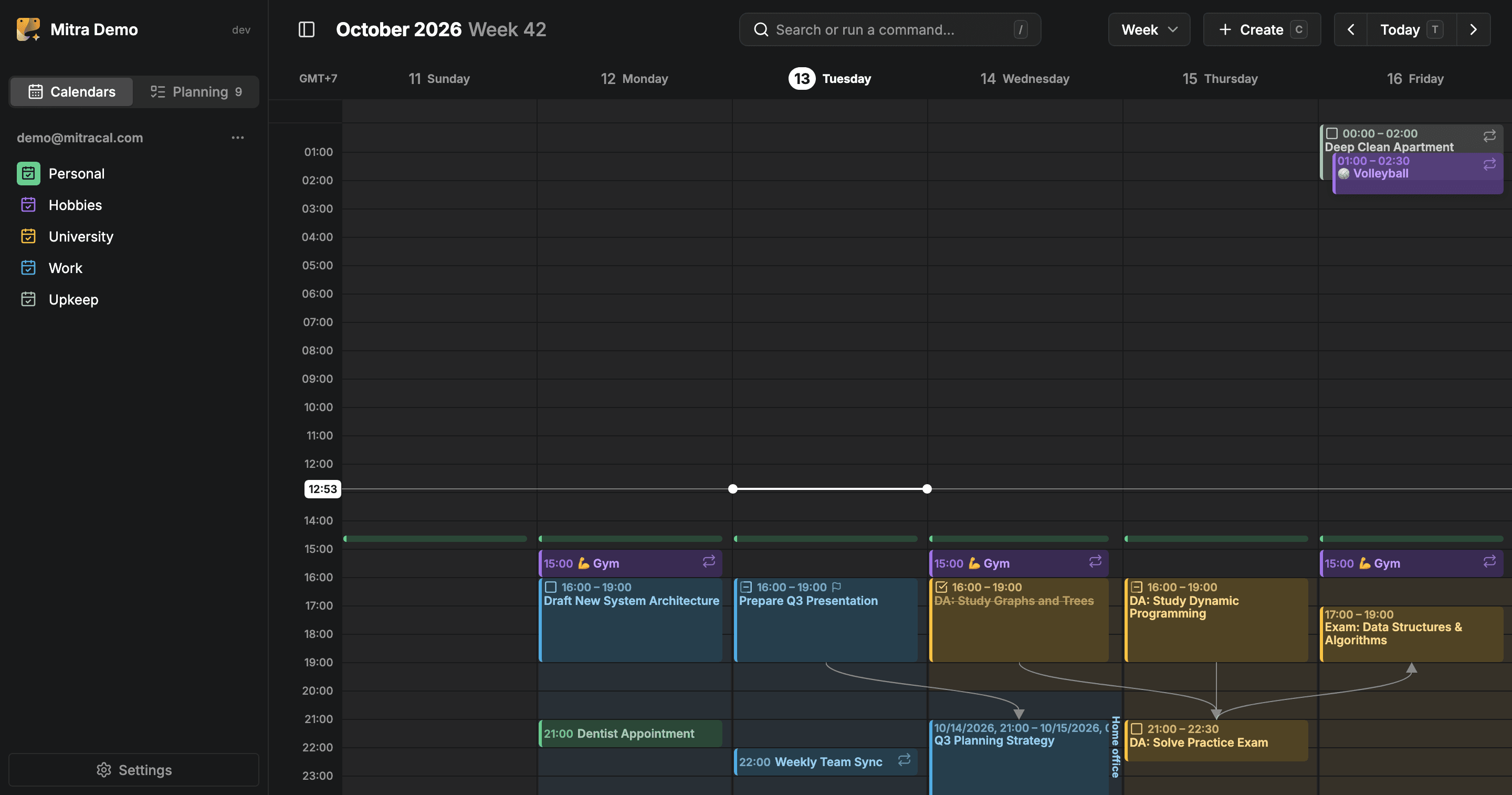
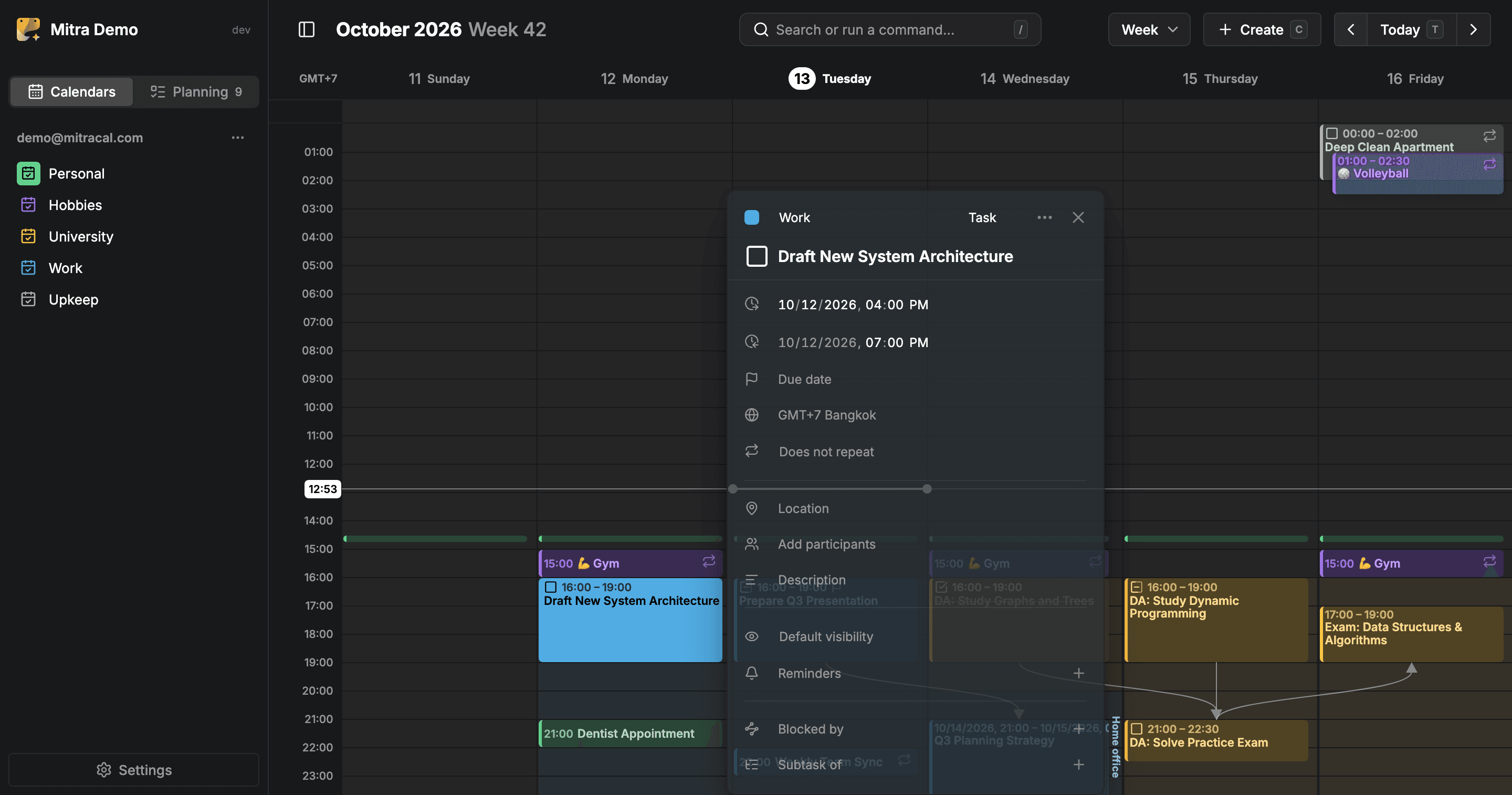
Mitra is a self-hosted web calendar that puts your events and your tasks on the same timeline, so you can see when you actually have room to get things done. It runs as a single Docker container on your own server with no telemetry and a database you own, and it is free under AGPL-3.0.
In week, month, year, timeline, and table views you can drag to create, move, and resize events and tasks alike. Tasks without a date wait in a Planning tab with a due date and an estimate until you drag them into your week, and the app supports availability, subtasks, dependencies, push-notification reminders, and guest lists with replies. A command palette makes it fully keyboard-driven.
Mitra keeps its own calendars or syncs two ways with CalDAV, Google Calendar, Apple Calendar, Notion, and Tempo; published feeds come in as read-only subscriptions. That makes it easy to run alongside the tools you already use instead of replacing them all at once.
Unlike Google Calendar, your schedule is not attached to an ad-supported Google account, and unlike Todoist or Fantastical, there is no pro subscription gating features like reminders or scheduling views. Mitra is early and moving fast — expect rough edges and breaking changes before the 1.0 release — but it already ships a demo instance if you want to try it before hosting.
Categories:
Build with:



Frequently Asked Questions
Which platforms does Mitra run on?
Mitra is a web application served by one Docker container, so it runs on any machine with Docker and you use it from any browser on desktop or mobile. There are no native client apps; the interface is responsive, supports seven languages including right-to-left, and has light and dark themes.
Which calendar services can Mitra sync with?
It syncs two ways with CalDAV servers and with Google Calendar and Apple Calendar through their integrations, and it can also connect to Notion and Tempo. Calendar feeds published by other services come in as read-only subscriptions.
What authentication options does Mitra support?
Out of the box Mitra is designed for one person with no sign-in. Multi-user sign-in for several people is supported, and the documentation covers how to enable it.
How do I back up my Mitra data?
Everything Mitra stores lives in the data folder you mount into the container, so backing up that folder backs up everything. Your data is on your server and is not sent anywhere.
Does Mitra have a demo I can try?
Yes, there is a hosted demo at demo.mitracal.com where you get a calendar of your own with sample entries and nothing to install, so you can evaluate it before self-hosting.
OpenAltFinder Score
Project Details
Repository details
Updated 10/13/2026, 6:00:18 AM
View RepositoryCompare Mitra with
Similar open source alternatives

tududi
Self-hosted task management that combines personal todo lists with powerful project organization. Built for individuals and teams who value privacy and control.
 Todoist
Kagelin
Self-hosted, offline-first productivity app combining tasks, habits, a Pomodoro focus timer, and calendar with optional WebDAV sync.
 TickTick
TaskTrove
Take Back Control of Your Productivity
Todoist
Vikunja
Self-hosted, open-source task manager with lists, kanban boards, Gantt charts, reminders, and CalDAV — a free alternative to Todoist.
Todoist
ownCloud
ownCloud is the pioneering open-source file sync and sharing platform. Self-host your cloud for files, calendars, contacts, and collaboration — your data.
 Google Drive
Donetick
Open-source task and chore manager for groups — natural-language scheduling, assignee rotation, and NFC completion triggers.
Todoist