
2FAuth
Self-hosted web app to manage your Two-Factor Authentication (2FA) accounts and generate TOTP and HOTP codes from any browser.
Open source alternative to:


What is 2FAuth?
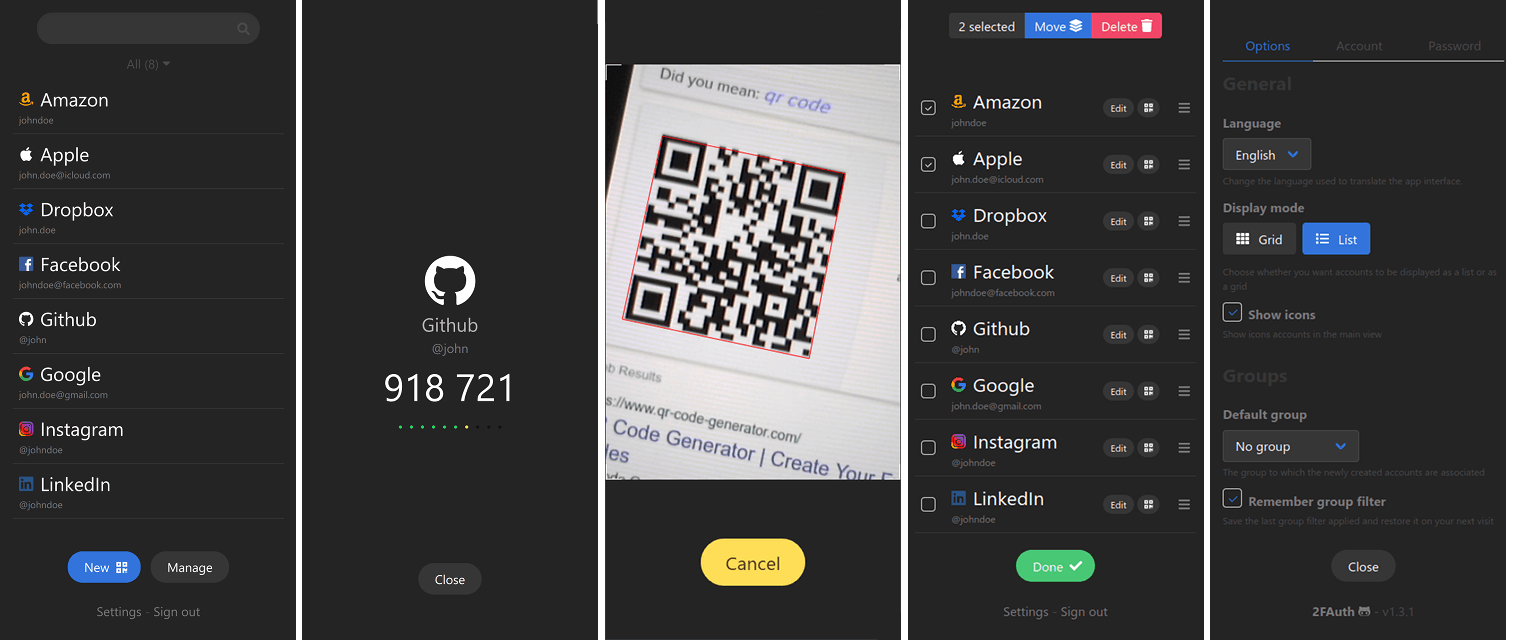
2FAuth is a self-hosted web application for storing, organizing, and generating two-factor authentication (2FA) codes. Instead of locking your OTP secrets inside a closed vendor app tied to a single device or account, 2FAuth keeps them in a database you control and exposes them through a clean web interface that works from any modern browser.
It supports both TOTP (time-based, RFC 6238) and HOTP (counter-based, RFC 4226) algorithms, with account setup via QR-code scanning or manual entry. Accounts can be grouped, filtered, searched, and tagged with custom icons. A built-in web extension lets you capture new secrets or pull a fresh code without leaving the page you are signing in to.
Self-hosting and features
2FAuth is designed primarily for self-hosting. It ships a Docker image and runs on any PHP-capable host with a MySQL, PostgreSQL, or SQLite database. Multi-user mode adds isolated per-user vaults, optional shared groups for shared service accounts, and a registration toggle for closed teams. Authentication options include local password, WebAuthn passkeys, and SSO via an Authentication Proxy that bridges OIDC, SAML, or LDAP.
Other notable features:
- Encrypted secret storage with session auto-lock
- Import from and export to common formats (Authy, Aegis, Google Authenticator QR strings, generic JSON / CSV)
- REST API with personal access tokens for automation
- Auditable logs for OTP generations and vault accesses
- Theming, internationalization, and a fully responsive mobile UI
How it compares
Compared with Authy, Microsoft Authenticator, and Google Authenticator, 2FAuth removes the dependency on a single phone, a vendor account, or a closed mobile ecosystem. You can use it from a laptop, a tablet, or any browser, share 2FA across a small team, and back up your vault on your own terms. The trade-off is that you run and patch the server yourself.

Frequently Asked Questions
Which platforms does 2FAuth run on?
2FAuth is a self-hosted PHP web application that runs on any Linux, macOS, or Windows server with PHP 8.1+ and a MySQL, PostgreSQL, or SQLite database. Official Docker images are provided. Companion browser extensions are available for Chrome, Firefox, and Edge, and the web UI is fully responsive for mobile browsers.
How do users sign in to 2FAuth?
Users can authenticate with a local username and password, a WebAuthn passkey, or single sign-on through the built-in Authentication Proxy, which bridges OIDC, SAML, and LDAP providers. Personal access tokens can also be issued for scripts and CI use.
What 2FA algorithms and setup methods are supported?
2FAuth supports both TOTP (RFC 6238) and HOTP (RFC 4226) one-time passwords. Accounts can be added by scanning a QR code from any standard authenticator enrollment page, or by manually entering the otpauth:// URI, secret, digits, period, and algorithm. Grouping, custom icons, search, and Steam Guard entries are all supported.
Can I import existing 2FA accounts from another app?
Yes. 2FAuth can import accounts from Authy, Google Authenticator QR-code exports, Aegis encrypted backups, and generic JSON or CSV files. Vaults can also be exported in the same formats for backup or migration to another instance.
Does 2FAuth support teams and shared accounts?
In multi-user mode each user gets an isolated vault, while groups can be created to share specific 2FA accounts (for example a shared social media or infrastructure account) with selected members. The administrator can disable public registration to keep the instance closed to invited users only.
Does 2FAuth have an API?
2FAuth ships a REST API for creating, listing, and generating OTP codes for accounts. Requests are authenticated with personal access tokens that can be scoped and revoked from the user profile. This makes it possible to wire 2FAuth into scripts, CI pipelines, or home automation flows.
OpenAltFinder Score
Project Details
Repository details
Updated 10/3/2026, 7:00:14 AM
View RepositoryRepository activity
Compare 2FAuth with
Similar open source alternatives

Authentik
Open source identity provider and SSO solution that replaces Auth0 and Okta with a self-hostable, flexible authentication platform.
 Auth0
Auth0
Trezur
Fast, secure, light-weight web-app to generate TOTP and HOTP tokens.
 Google Authenticator
OTPHub
Simple OTP app for desktop and mobile.
Google Authenticator
Toofer
Toofer is a local-first, web-based two-factor authentication app that stores your TOTP secrets directly in your browser. Private, simple, fully offline.
Google Authenticator
Open Authenticator
Free, open-source cross-platform TOTP authenticator with self-hostable sync backend, built with Flutter.
Google Authenticator