BookOrbit
Self-hosted library and reading platform for ebooks, audiobooks, PDFs, and comics with built-in web readers and Kobo/KOReader sync.


What is BookOrbit?
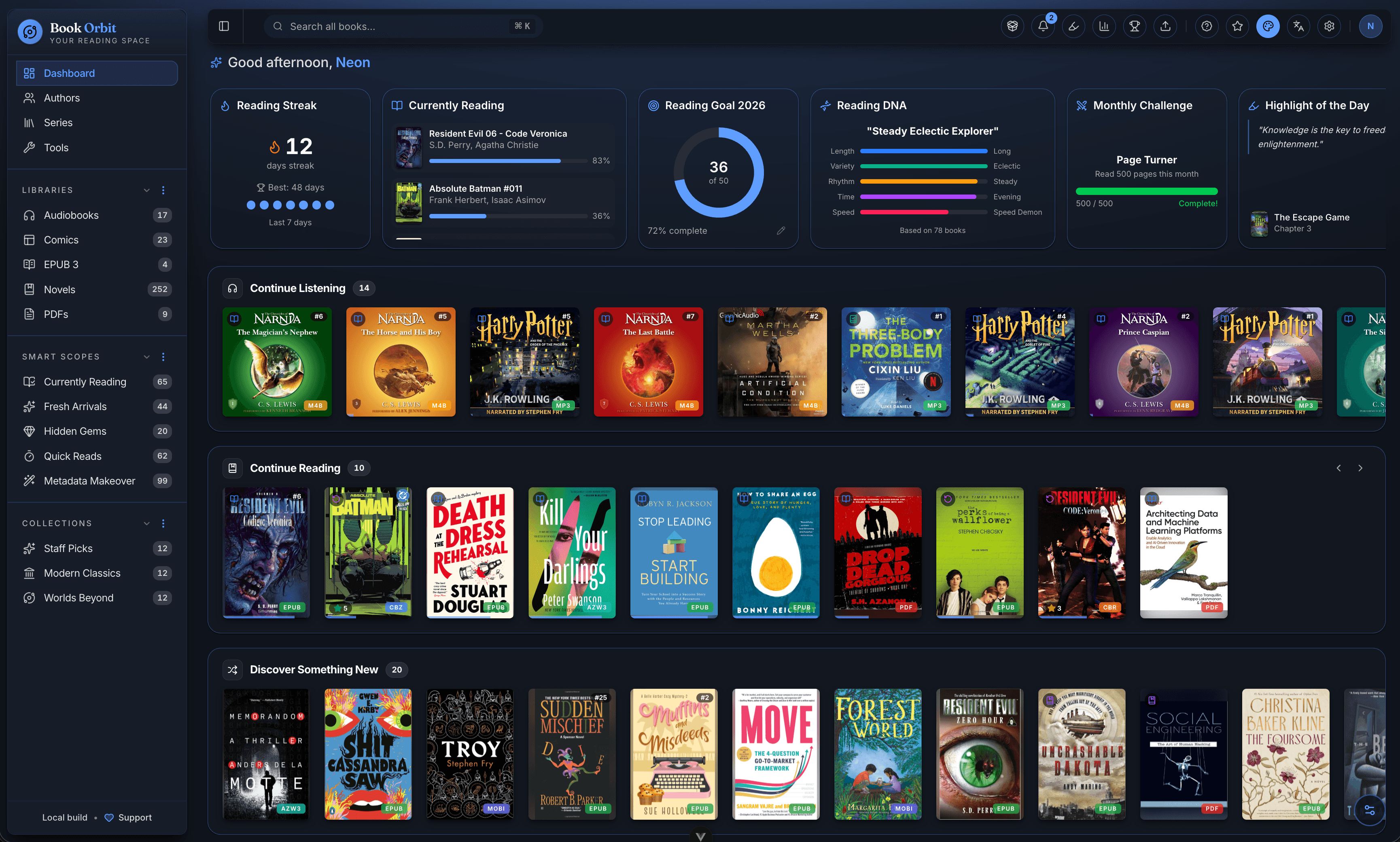
BookOrbit is a self-hosted library and reading platform that organises your ebooks, audiobooks, PDFs, and comics and lets you read or listen to them across the built-in web reader, KOReader e-ink devices, and Kobo e-readers. Progress, highlights, and reading status sync bidirectionally between all three, so you can start a chapter in one place and finish it in another.
Around that core sit 14 metadata providers (Google Books, Open Library, Amazon, Goodreads, Kobo, Hardcover, Audible, Audnexus, Libro.fm, iTunes, ComicVine, RanobeDB, Aladin, Lubimyczytać), reading statistics and achievements with a Reading DNA profile, OPDS and Send-to-Kindle delivery, multi-user accounts with OIDC/SSO, and automatic sync out to Hardcover, Readwise, and StoryGraph.
Key features
- Built-in web readers for ebooks (EPUB, KEPUB, MOBI, AZW3, AZW, FB2), PDFs, comics (CBZ, CBR, CB7), and audiobooks (M4B, MP3, M4A, OPUS, OGG, FLAC) with no extra plugins required.
- Three-way sync between Kobo devices, KOReader, and the BookOrbit web reader. Progress and annotations flow bidirectionally, including highlights and deletions.
- KOReader plugin with on-device catalog browsing, search, download, and rating management, plus full progress and annotation sync.
- Annotations & highlights from the web reader, KOReader, and Kobo merge into one searchable hub, filterable by colour, style, and source, and exportable as Markdown, CSV, or JSON.
- Hardcover, Readwise & StoryGraph sync push status, progress, reading dates, and ratings on configurable triggers. Hardcover read history can also be pulled back to backfill blank BookOrbit entries.
- Statistics, goals & achievements with daily reading time, heatmaps, streaks, library health, yearly goals, monthly challenges, and 50+ achievements across five categories.
- Multiple libraries with per-library folders, custom scan rules, and format priorities.
- Smart scopes & collections via curated lists and dynamic, rule-based saved filters.
- Multi-user & SSO with granular per-user permissions, isolated reading data, and native support for Authentik, Keycloak, and Authelia via OIDC.
- Multilingual interface managed on Crowdin with community translations.
- Content delivery via OPDS, Send-to-Kindle by email, browser drag-and-drop uploads, and a Book Dock drop folder for hands-free importing.
Self-hosting
BookOrbit ships a docker-compose.yml and a Dockerfile. The minimum setup uses Postgres and runs the server plus a static frontend on a single host. The official installation guide covers reverse proxies, file permissions on NAS, external databases, and the full environment variable reference. There are also dedicated migration guides for users coming from Audiobookshelf (one-time import) and Calibre-Web Automated (stopped-snapshot import).
How it compares to Audible, Scribd, and Kindle
Where Audible, Scribd, and Kindle lock your library inside their apps and bill you monthly for access, BookOrbit reads your own files on infrastructure you control. Highlights and progress follow you across the web reader, a Kobo, or KOReader instead of being trapped in one vendor's ecosystem. The audiobook player handles the same formats Audible does (M4B, MP3, M4A, OPUS, OGG, FLAC) without a subscription gate, and the Send-to-Kindle bridge lets you push EPUB and PDF files straight to a Kindle device if you still want one.
Categories:





Frequently Asked Questions
Which platforms does BookOrbit run on?
BookOrbit is a web app that runs in any modern browser, so it works on Linux, macOS, Windows, ChromeOS, and most tablets. The KOReader plugin adds a native catalog browser, progress sync, and two-way annotation sync to any KOReader-supported e-ink device. Kobo e-readers sync progress and highlights with BookOrbit through a built-in Kobo sync driver, so you do not need a native BookOrbit app for the e-ink side.
What authentication options does BookOrbit support?
Local accounts with username and password are built in. Single sign-on is supported via OIDC, with native integration tested against Authentik, Keycloak, and Authelia. Permissions are granular per user and reading data is isolated between accounts, so a family or small library can share one server without mixing libraries.
Can I import existing data into BookOrbit?
Yes. The repository ships a one-time migration guide for Audiobookshelf and a stopped-snapshot migration guide for Calibre-Web Automated, covering users, libraries, progress, and metadata. Book files are simply placed in a host folder that BookOrbit scans, so any DRM-free collection of EPUB, KEPUB, MOBI, AZW3, FB2, PDF, CBZ, CBR, CB7, M4B, MP3, M4A, OPUS, OGG, or FLAC can be loaded without a separate importer.
What integrations does BookOrbit support?
BookOrbit pushes status, progress, reading dates, and ratings to Hardcover on configurable triggers, status and progress to The StoryGraph, and new highlights and notes to Readwise. It can also pull Hardcover read history back to backfill blank entries. Content delivery includes OPDS feeds for compatible apps, Send-to-Kindle via email, and browser drag-and-drop uploads.
What are the system requirements to self-host BookOrbit?
The reference deployment uses Docker Compose with the included Dockerfile plus a Postgres database. A small personal library runs comfortably on 2 GB of RAM and modest CPU; larger audiobook-heavy libraries benefit from SSD storage and more memory because the server transcodes audio on the fly. The official installation guide covers reverse proxy setup, NAS file permissions via PUID/PGID, external databases, and the full environment variable reference.
OpenAltFinder Score
Project Details
Repository details
Updated 10/4/2026, 6:00:14 AM
View Repository BookOrbit vs Bookshelf