
HyCanvas
Open-source AI-native design platform for social graphics, presentations, video, and whiteboards. Self-hosted, with no paywalls or watermarks.
Open source alternative to:

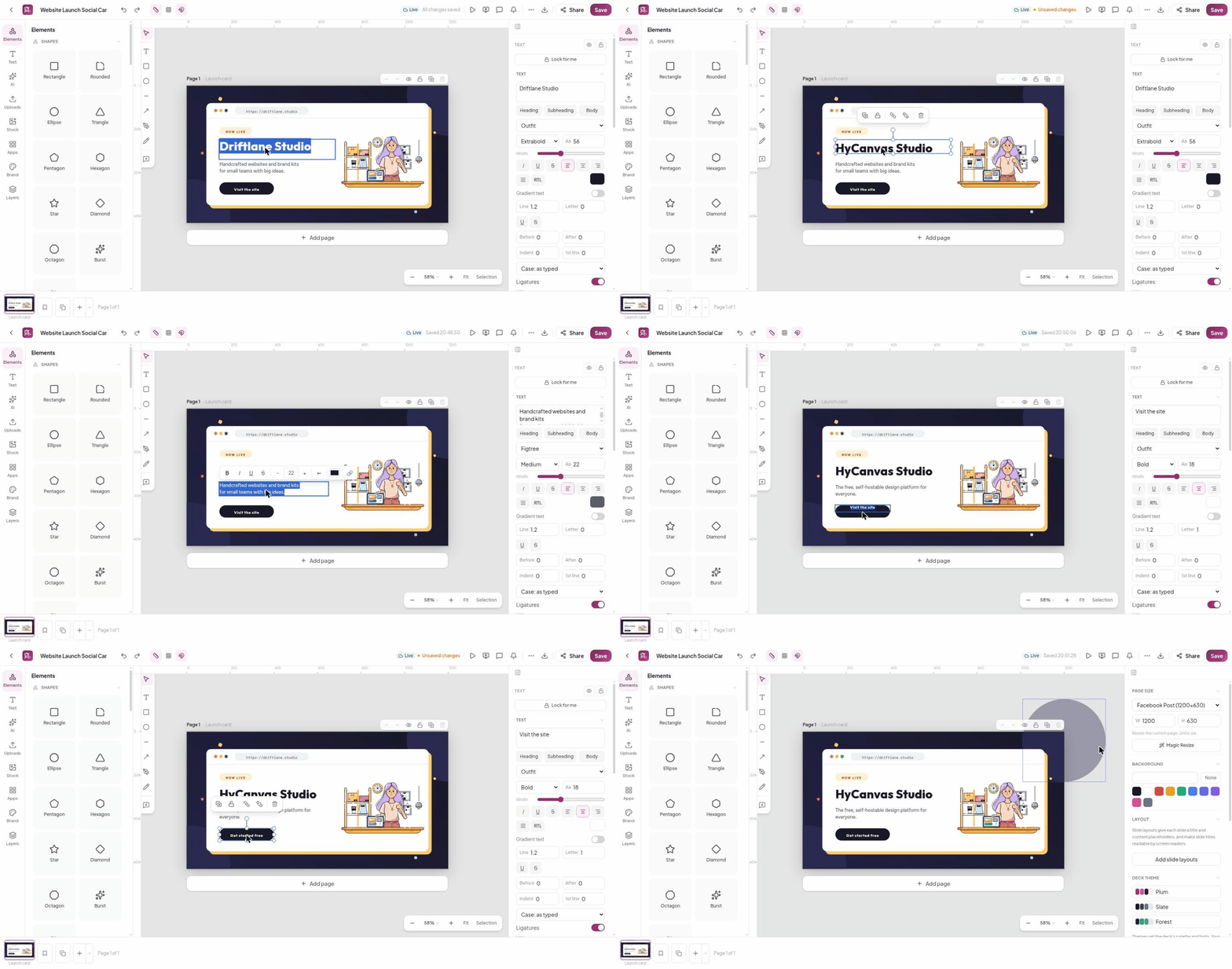
HyCanvas is a free, open-source, AI-native design platform from HyScaler. It covers social graphics, presentations, video, whiteboards, docs, and print in a single browser-based editor, with a built-in template catalog, brand kits, and export to PNG and PDF — with no paywalls and no watermarks. Documents live in an open format: any design can be downloaded as a portable .hyc file (readable JSON) and imported on any HyCanvas instance, so your work is never locked in.
Where Canva ties AI features to paid tiers, HyCanvas takes a bring-your-own-key approach: AI provider keys are configured per workspace (or per user) at runtime, stored encrypted, and used directly against your chosen provider. A generation API turns a prompt into a complete, editable presentation — with optional grounding sources, language, and brand palette — and every instance serves an MCP endpoint so AI agents get the same generate, fetch, export, and share capabilities. Scoped API keys, budgets, and a 90-day audit trail are built in for workspace admins.
Self-hosting is deliberately simple: the production bundle is a single self-contained Go binary with the statically-exported Next.js frontend embedded, serving the UI, REST API, and realtime WebSocket on one port — no Node runtime required. Prebuilt binaries ship for Linux (amd64/arm64), macOS (Intel/Apple Silicon), and Windows, alongside a Docker Compose setup and a first-run setup wizard that configures PostgreSQL, storage (local or S3/MinIO), SMTP, and reverse-proxy settings. Compared to Canva, you trade the hosted convenience and stock-content library for full data ownership, an open file format, and AI you control — realtime collaboration and AI media generation are still on the roadmap.
Tags:





Frequently Asked Questions
Which platforms does HyCanvas support?
The editor is web-only and runs in any modern browser. For self-hosting, HyCanvas ships a single prebuilt binary for Linux (amd64 and arm64), macOS (Intel and Apple Silicon), and Windows (amd64), plus a Docker image. There is no native desktop or mobile editor app.
What authentication options does HyCanvas support?
Email and password, magic-link email sign-in, and OIDC single sign-on (Google or any standards-compliant provider) are built in. Each method has independent login and signup toggles enforced server-side, and the login and signup forms can be protected with Cloudflare Turnstile or Google reCAPTCHA.
Does HyCanvas have an API or AI agent support?
Every instance serves a REST API under /api/v1 with OpenAPI documentation at /api/docs, including a generation endpoint that turns a prompt into a complete, editable presentation. There is also an MCP endpoint at /mcp with generate, fetch, export, and share tools, using the same scoped API keys with budgets and a 90-day audit trail for workspace admins.
Can I move my designs between HyCanvas instances?
Yes. Any document can be downloaded as a portable .hyc file — plain, readable JSON — and imported on any other HyCanvas instance. Designs can also be exported to PNG, PDF, and other formats with no watermarks.
What are the system requirements to self-host HyCanvas?
A PostgreSQL database is required. The single Go binary needs no Node runtime, and ffmpeg should be installed for server-side video export and large-video preview proxies (it is bundled in the Docker image). Object storage on S3, MinIO, R2, or similar is optional; the default is local-disk storage.
OpenAltFinder Score
Project Details
Repository details
Updated 10/17/2026, 5:00:41 AM
View RepositoryCompare HyCanvas with
Similar open source alternatives

Doory
Open-source browser design editor for posters, social posts and slides, with templates, real-time co-editing and PNG, SVG, PDF and video exports.
 Canva
Canva
AFFiNE
Open-source knowledge base combining note-taking, whiteboard, and project planning in one workspace.
 Notion
Slidev
Markdown-based presentation slides for developers, with code highlighting, Vue components, theming, and PDF/PPTX export.
 Microsoft PowerPoint
SnapOtter
Self-hosted image manipulation platform with 45+ tools, local AI, and pipelines. A privacy-first open source alternative to Canva, TinyPNG, and remove.bg.
Canva
Excalidraw
Open-source virtual whiteboard for creating hand-drawn style diagrams and sketches.
 Miro
Miro
Kova
Open source desktop Markdown presentation editor with live preview, themes, and PPTX export — a self-contained alternative to PowerPoint.
Microsoft PowerPoint