
Rocket.Chat
Self-hosted team chat with channels, threads, voice and video calls, federation, plus desktop and mobile apps.
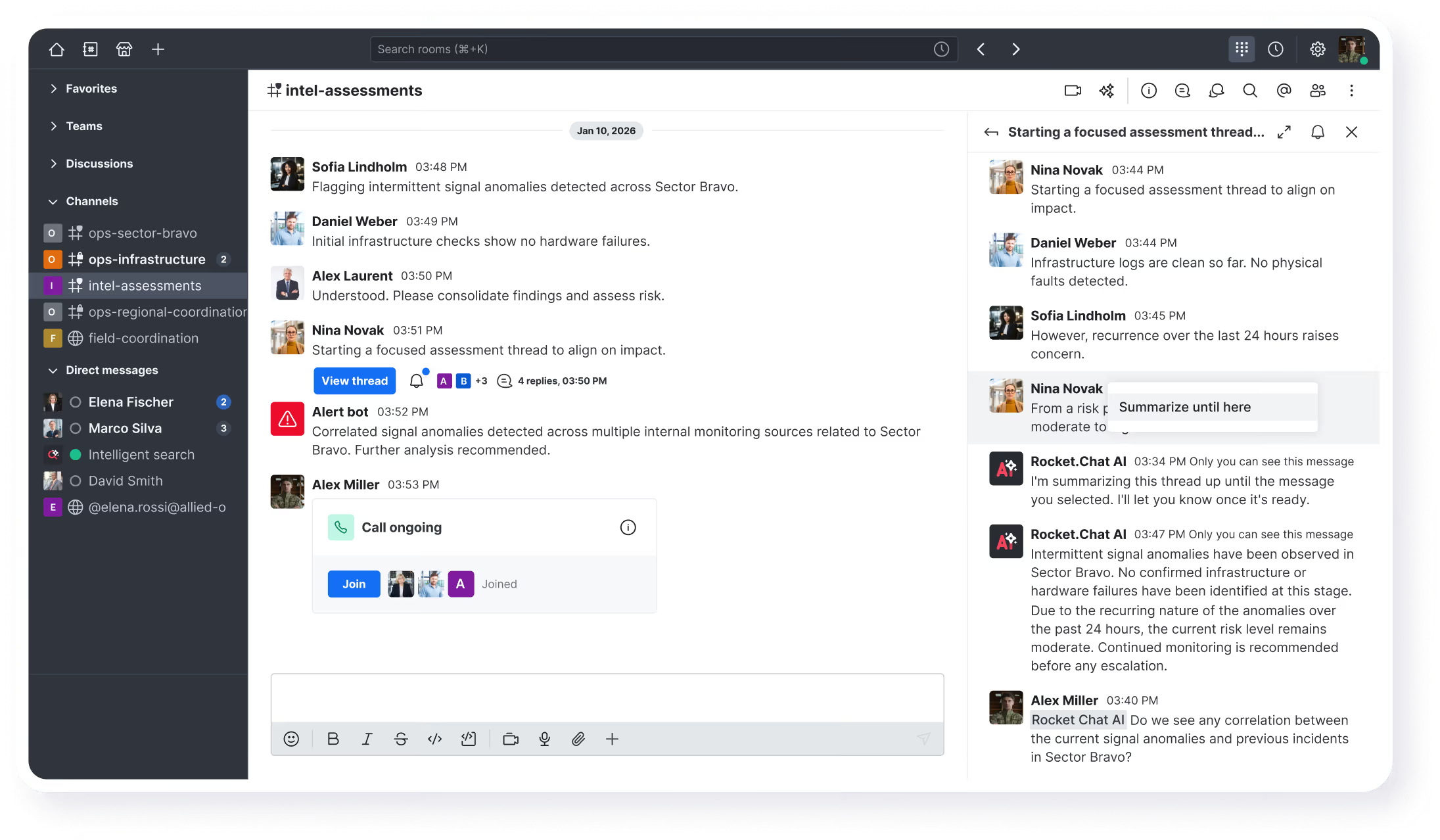
Rocket.Chat is an open-source team communication platform written in TypeScript. Run it as a web app on your own server and connect through the native desktop clients for macOS, Windows and Linux, or the iOS and Android apps. It covers channels, direct messages and threads, voice and video calls with screen sharing, file sharing, and native federation, so separate installations can exchange messages and share users across organisations.
Deployment options include Docker, Podman, Kubernetes and the Launchpad installer, plus air-gapped workspaces for networks with no internet access and a vendor-hosted cloud if you would rather not run infrastructure. Administration covers identity management, end-to-end encryption, role- and attribute-based access control, and compliance tooling. Extensibility comes from the open-source Apps-Engine and the public app Marketplace, with a REST API for everything else — including an Import API for large migrations. Existing workspaces can be migrated from a Slack export, Slack users CSV, a formatted CSV package, or the legacy HipChat importer.
The pitch is Slack, Microsoft Teams or Discord without giving up control of the data: the community edition is MIT-licensed and self-hosted with no per-user limit. Some capabilities sit behind paid plans — from version 9.0.0, LDAP, SAML and custom OAuth authentication require a premium plan, as do parts of the compliance and support offering. For organisations that need tighter data residency than SaaS chat allows, that trade-off is usually acceptable; for a small team that only wants free channels and calls, the community edition is enough.
Categories:





Frequently Asked Questions
Which clients does Rocket.Chat provide?
There is a browser client, an Electron desktop app available from the Mac App Store, the Microsoft Store and Snapcraft for Linux, and React Native mobile apps for iOS and Android. Every client connects to a server URL you choose, so the same workspace is reachable from a desktop, a phone and the web at once.
What authentication options does Rocket.Chat support?
The default is email and password with optional two-factor authentication over TOTP or email. Single sign-on covers OAuth providers such as Google, Apple and GitHub, OpenID Connect for providers like Keycloak and Okta, CAS, and iframe-based external authentication. LDAP, SAML and custom OAuth require a premium plan from version 9.0.0 onward, so community workspaces relying on them must upgrade or move to another method before that release.
Can I import my Slack history into Rocket.Chat?
Yes. Under Manage, Workspace, Import you can select an import type and upload a Slack export archive, either a full workspace export or a Slack users CSV. Custom migrations use the CSV importer, which expects a flat zip containing channels.csv, users.csv and per-channel message files in a specific format, and the legacy HipChat importer is still available. Large transfers can be scripted with the Import API, and Mattermost has no built-in importer, so its export first has to be converted to Rocket.Chat's CSV format.
Can Rocket.Chat run on an air-gapped network?
Yes. Rocket.Chat documents an air-gapped deployment for isolated networks that cannot reach the internet, and the supported install paths are Docker, Podman, Kubernetes or the Launchpad tool for Kubernetes. An air-gapped workspace keeps messaging, file sharing and calls internal, but app installs from the public Marketplace and native federation with external organisations both need connectivity, so those features are unavailable or limited by design.
Does Rocket.Chat have an API and integrations?
The server exposes a documented REST API covering users, rooms, messages, OAuth apps and imports, with interactive API docs at developer.rocket.chat. Integrations are built as apps with the open-source Apps-Engine framework and can be distributed through the Rocket.Chat Marketplace, and the workspace also supports native federation so two independent installations can share channels and users. Everything runs on the same self-hosted server, so integrations do not depend on a SaaS connector tier.
OpenAltFinder Score
Project Details
Repository details
Updated 11/10/2026, 4:00:56 PM
View RepositoryRepository activity
Get the latest open source alternatives delivered weekly.
Discover tools that give you freedom from proprietary software.
Compare Rocket.Chat with
Similar open source alternatives

Mumble
Low-latency, open-source voice chat built for gaming — self-host your own server with no subscription required.
 Discord

Chatto
A self-hosted chat application for teams and communities with video calls, voice calls, and screen sharing.
 Slack

Sharkord
Self-hosted chat server with voice, video, text, and screen sharing — Discord-like features on your own infrastructure.
Discord
Zulip
Open-source team chat with a unique topic-based threading model that makes it easy to follow multiple conversations.
Slack
Raven
Simple, open source team messaging platform
Discord
Element
Open-source Matrix client for secure, decentralized messaging, voice, and video — runs on your own server.
Discord