Keeweb
Free cross-platform password manager compatible with KeePass, available as a desktop and web app.




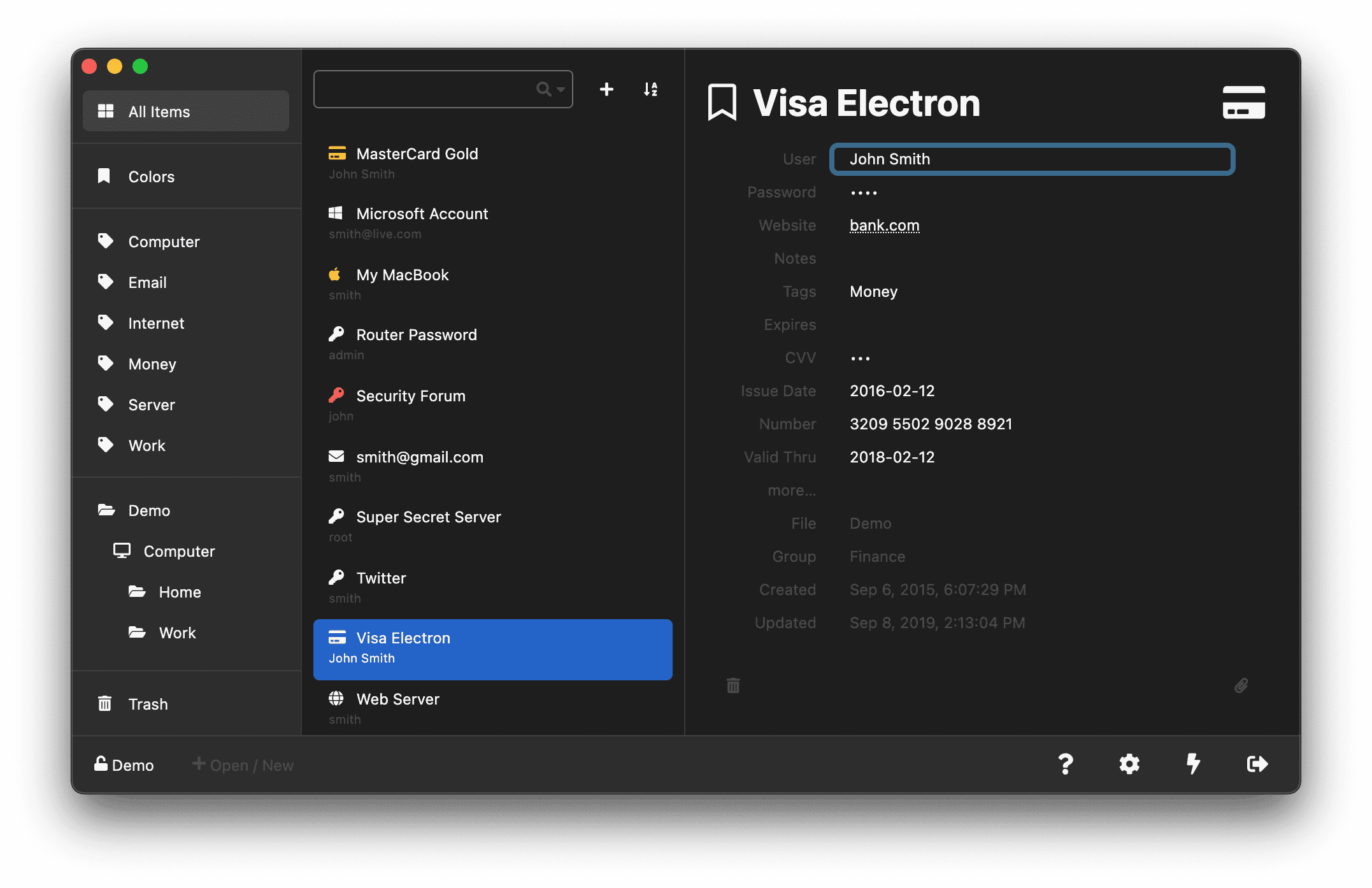
Keeweb is a free, open-source password manager that works seamlessly with KeePass .kdbx databases. It runs as both a desktop application (built on Electron) for Windows, macOS, and Linux, and as a web app you can host yourself or use directly from keeweb.info — so your vault travels with you across platforms.
Your credentials stay in an encrypted KeePass-compatible database that you fully control. Keeweb can open and edit existing .kdbx files created by KeePass, KeePassXC, and other compatible tools, so you can migrate without losing data. Vaults can be stored locally, in popular cloud services such as Dropbox, Google Drive, and OneDrive, or in a self-hosted Docker container.
Features include a built-in password generator, automatic icon fetching, attachment support, keyboard shortcuts, multiple color themes, and a clean interface designed for fast entry and retrieval of credentials. Because it uses the well-audited KeePass database format, you can always switch clients without lock-in.
Categories:
Build with:





Frequently Asked Questions
What is Keeweb?
Keeweb is a free, open-source password manager built on Electron that runs as both a desktop app and a self-hosted web app. It uses the open KeePass .kdbx database format, so your vault stays compatible with KeePass, KeePassXC, and other KeePass-based tools.
Does Keeweb work with my existing KeePass database?
Yes. Keeweb can open and edit any standard .kdbx file created by KeePass, KeePassXC, or other KeePass-compatible applications. You can migrate between clients without losing data, and your vault stays in a well-audited open format you control.
Where is my password vault stored?
You decide. Keeweb can store the encrypted database locally, sync it through a popular cloud provider like Dropbox, Google Drive, or OneDrive, or self-host the web app via Docker and keep the vault on your own server. The database is encrypted end-to-end, so no service ever sees your passwords in plaintext.
Can I self-host Keeweb?
Yes. Official Docker images are published on Docker Hub, and you can run the web app behind a reverse proxy with HTTPS. Self-hosting gives you full control over your data while still getting the convenience of accessing the vault from any browser.
Is Keeweb free?
Yes. Keeweb is completely free and open source under the MIT license, with no paid tiers, ads, or telemetry. The desktop builds are available on GitHub releases and the web app is free to use at keeweb.info.
OpenAltFinder Score
Project Details
Repository details
Updated 9/30/2026, 4:00:17 AM
View RepositoryRepository activity
Sponsor Keeweb
Compare Keeweb with
Similar open source alternatives

PearPass
Privacy-first, peer-to-peer password manager with end-to-end encryption and no central servers.
 1Password
KeePassXC
KeePassXC is a cross-platform, community-driven port of KeePass Password Safe. Store credentials locally in an encrypted database, with no cloud required and full data control.
1Password
Vaultwarden
Vaultwarden is an unofficial, Bitwarden-compatible server written in Rust. Self-host your password vault with low resource use and full compatibility with all Bitwarden clients.
1Password
RavenPass
Local-first, end-to-end encrypted password manager with passkeys, TOTP codes and native autofill. No account required, no telemetry.
1Password
TeamPass
Self-hosted collaborative password manager for teams. Organize and share credentials with role-based access control.
1Password
Passbolt
Open-source, security-first password manager designed for teams. End-to-end encryption, granular access control, and self-hostable.
1Password