
OpenCode
Open-source AI coding agent with a terminal UI, desktop and web apps, bring-your-own models, agents, plugins, and MCP support.
Open source alternative to:

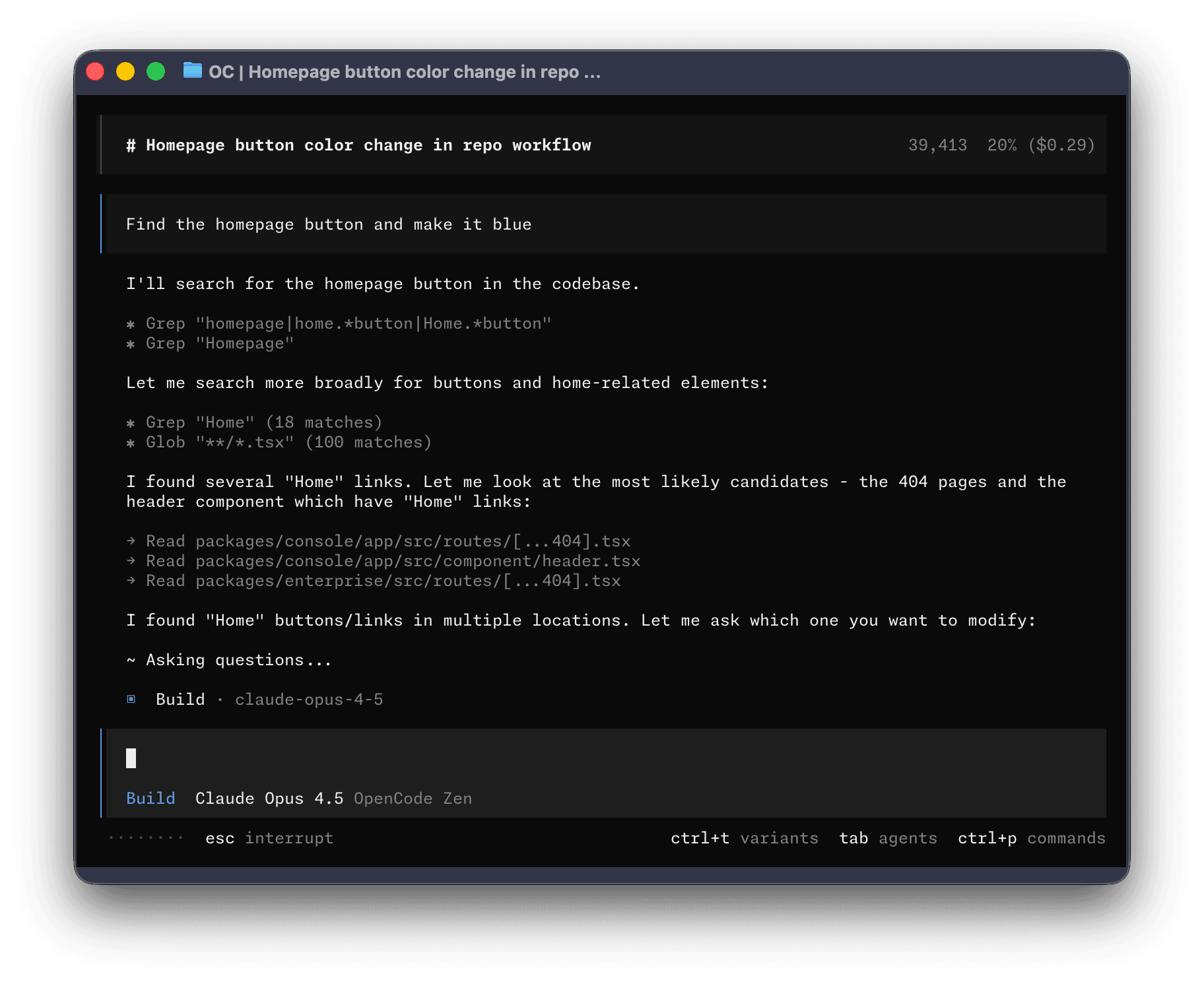
OpenCode is an open-source AI coding agent that works on your repository the way a developer would: it reads files, runs commands, edits code and keeps the session going across turns. The same engine ships as a terminal interface, a desktop application currently in beta for macOS, Windows and Linux (AppImage, deb, rpm), and a web interface started with opencode pair, which hands out a one-time link that expires in five minutes. You can install it with the curl script, npm, bun, pnpm, yarn, Homebrew, pacman, mise or Nix, or run the published Docker images. A shared background server means several local clients can attach to the same work.
Model choice is open rather than bundled: run /connect to add a provider, then /models to pick one from the models.dev catalog, set a default in opencode.jsonc, or override it per run with --model. Providers that are not in the catalog can be added as OpenAI-compatible endpoints with a base URL and an environment variable for the key. The built-in build agent has full tool access while the plan agent is read-only and asks before running shell commands, and you can define custom agents, subagents, skills, commands and plugins in markdown or JSONC. Permission rules resolve to allow, ask or deny with wildcards on actions such as shell, edit, read and subagent, saved approvals are project-scoped, and organisation policies can hard-deny a call. MCP servers are supported with OAuth for remote ones, and snapshots plus compaction keep long sessions recoverable.
It positions itself against Claude Code, Codex and the closed IDE agents: MIT-licensed, indifferent to which model vendor you use, and usable from a terminal, a native window or a browser without changing workflow. The trade-off is that the desktop app is still beta, Windows package managers are not supported (use the standalone binary), and model access is yours to arrange through provider keys or the optional OpenCode Go subscription. Teams that want central billing and policy can attach the Console workspace with SSO, SCIM and budgets, but it is not required to use the agent.
Categories:
Build with:





Frequently Asked Questions
Which interfaces does OpenCode offer?
There is a terminal interface, a desktop app in beta with builds for macOS on Apple silicon and Intel, Windows x64 and ARM64, and Linux as AppImage, deb or rpm, plus a web interface. The web interface is reached with the opencode pair command, which prints a link that works once and expires after five minutes. All of them talk to a shared background server, so several clients can attach to the same running work, and Docker images are published for containerised setups.
How do I choose which model OpenCode uses?
Run /connect to add a provider with its credentials, then /models to select from the models.dev catalog and the providers you have configured. A default belongs in opencode.jsonc under the model key, and a single run can override it with opencode run --model provider/model. Providers that are not in the catalog can be declared as OpenAI-compatible endpoints with a base URL and an environment variable holding the key, which also covers proxies and self-hosted inference. OpenCode Go is an optional subscription for models tested by the OpenCode team, connected like any other provider.
How do agents and permissions work in OpenCode?
The build agent has full tool access and the plan agent is read-only, denies file edits and asks before running shell commands; a general subagent handles broad searches and multi-step tasks. Custom agents live in markdown or JSONC with their own mode, model, prompt and permission set, and subagents use their own rules rather than inheriting the parent's. Permissions are allow, ask or deny rules with wildcards over actions such as shell, edit, read and subagent, the last matching rule wins, and approvals granted with Allow always are saved as project-scoped rules that never override a deny. Organisation policies applied through the Console can hard-deny a check after project rules run.
Does OpenCode support MCP servers?
Yes. Add a remote server with a command such as opencode mcp add context7 --url https://mcp.context7.com/mcp, adding --global to make it available in every project, and check connections with opencode mcp list. Remote servers use OAuth by default, and any that report needs authentication are signed in through the /mcps dialog. Servers can also be declared by hand under mcp.servers in opencode.jsonc as a local command or a remote URL, with a disabled flag to keep one configured without connecting it.
Can I extend OpenCode with plugins?
Plugins can add tools, hooks, integrations, commands, agents and other behaviour, and they install with opencode plugin add using an npm name, version range, or a GitHub and SSH git specification, including private repositories your git credentials can reach. Local plugins live under .opencode/plugins and reload when their files change, while CLI-only plugins are configured separately in cli.json. You can list, check, update and remove plugins from the CLI, disable individual entries with a minus prefix, and the policy and Console provider plugins cannot be removed by a repository.
OpenAltFinder Score
Project Details
Repository details
Updated 11/14/2026, 11:01:39 AM
View RepositoryRepository activity
Get the latest open source alternatives delivered weekly.
Discover tools that give you freedom from proprietary software.
Compare OpenCode with
Similar open source alternatives

Juggler
A self-hostable, GUI-first AI coding agent with editable conversation trees, plugin-based tools, and multi-client sessions.
 Cursor

MiMoCode
An open-source terminal-native AI coding agent with cross-session memory, multiple agents, and support for any LLM provider.
 Claude Code

Oh My Pi
Open-source terminal coding agent with IDE intelligence — LSP renames, live debugging, and 60+ AI providers under an MIT license.
Claude Code
Orbi
Self-hosted coding factory that turns labeled GitHub Issues into independently reviewed, merged PRs and releases.
 Devin

Pi
Minimal, extensible open-source coding agent CLI with a multi-provider LLM API, packages, MCP support, and a TypeScript SDK.
Claude