OpenScreen
Free, open-source screen recorder and video editor with polished demos, captions, zooms, and local AI editing.
Open source alternative to:


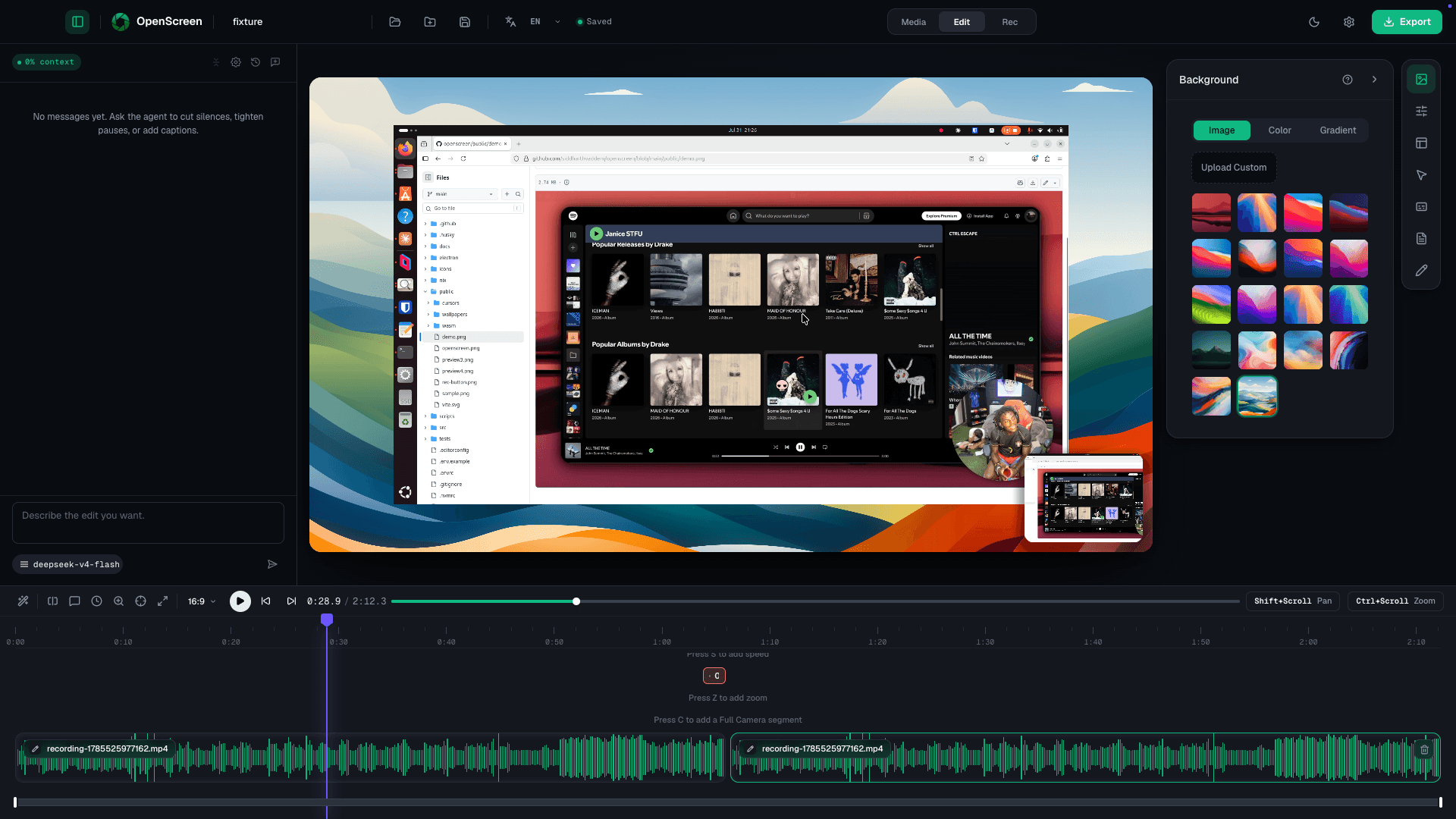
OpenScreen is a free, open-source desktop screen recorder and video editor for creating polished product demos, walkthroughs, documentation, and marketing videos. It records windows or entire screens with microphone, system audio, webcam overlays, cursor effects, zooms, captions, annotations, backgrounds, trimming, speed controls, and MP4 or GIF export.
This is the community-maintained continuation of the original OpenScreen project by Siddharth Vaddem, whose repository is archived. OpenScreen runs locally on macOS, Windows, and Linux, is free for personal and commercial use under the MIT license, and includes an optional on-device AI editing layer with local transcription, transcript-driven editing, and bring-your-own-key chat editing.
Categories:





Frequently Asked Questions
What is OpenScreen?
OpenScreen is a free, open-source desktop screen recorder and video editor for creating polished product demos, walkthroughs, and documentation videos.
Is OpenScreen free to use?
Yes. OpenScreen is MIT-licensed and free for personal and commercial use, with no subscriptions, watermarks, or paid feature tiers.
Does OpenScreen upload recordings or transcripts?
Recording and editing happen locally. Its optional transcription uses on-device Whisper models, while chat editing requires your own configured LLM provider and key.
Looking for contributors
This project is actively seeking help, join the community!
OpenAltFinder Score
Project Details
Repository details
Updated 9/28/2026, 6:00:19 PM
View RepositoryRepository activity
Compare OpenScreen with
Similar open source alternatives
VoiceStudio
Fully local voice cloning, dubbing, dictation, and transcription in one desktop app - an open-source ElevenLabs replacement.
 ElevenLabs
Recordly
Recordly is an open-source screen recorder and editor with auto-zoom, webcam overlays, smooth cursor animations, and one-click shareable video hosting for product teams.
 Screen Studio
Snapify
Open source screen recording sharing platform — a self-hostable Loom alternative.
 Loom
Loom
Speakr
Self-hosted AI transcription and intelligent note-taking platform that turns audio recordings into organized, searchable notes with speaker identification.
 Otter.ai
Cap
Cap is an open-source Loom alternative for beautiful, shareable screen recordings. Record in 4K, get instant share links, and keep full content ownership on your own infrastructure.
Loom
OBS Studio
OBS Studio is free and open source software for live streaming and screen recording. Capture, mix, and broadcast video with pro-grade tools used by streamers and creators worldwide.
 Camtasia