
FableCut
A browser-based video editor built for humans and AI agents. Edit with a drag-and-drop UI, a JSON timeline, MCP tools, or its REST API.
Open source alternative to:


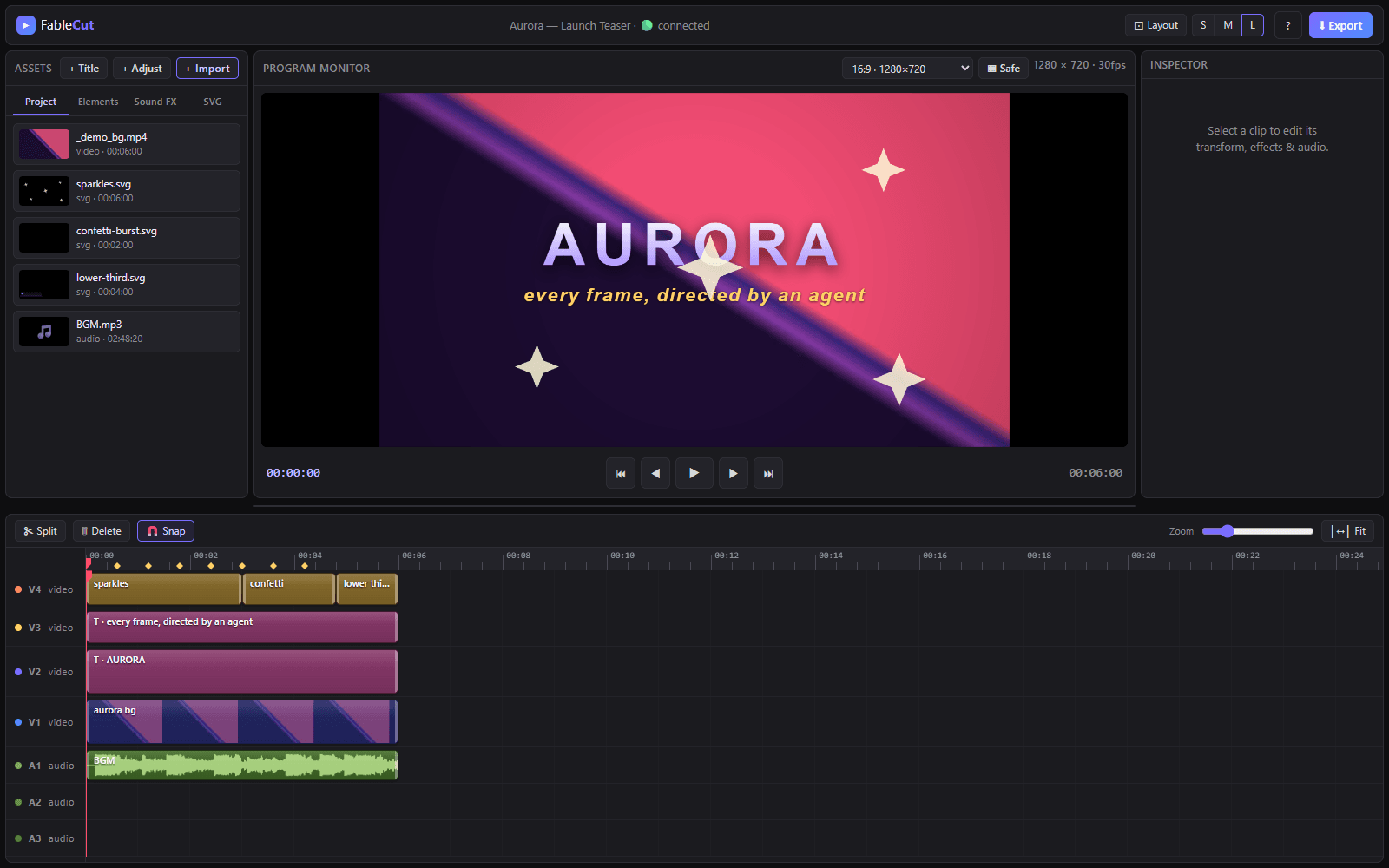
FableCut is a Premiere-style non-linear video editor that runs entirely in your browser. Its defining trick: the entire editing timeline is one JSON document. You can build an edit by hand in the UI, write or tweak that JSON directly, or hand the whole session to an AI agent (Claude Code, Claude Desktop, or anything that speaks MCP or REST) and watch cuts appear in the live-reloading timeline.
Under the hood it is a real editor, not a demo: 4 video and 3 audio tracks with drag, trim, split and snap; beat, cue and waveform-synced audio; aspect presets for 16:9, 9:16 reels, 4:5 and 1:1; 12 one-click filter presets; adjustment layers and full grade controls (brightness, contrast, saturation, hue, temperature, tint, blur, vignette, film grain); plus chroma key with spill suppression and AI background removal via MediaPipe.
Motion and text tooling is equally complete — keyframe animation on ~25 properties with easing curves, speed ramps, camera shake, RGB-split aberration, and kinetic captions (typewriter, word-pop, karaoke, wave, bounce, neon glow) with Google Fonts, gradient fills and background pills. Because edits are plain JSON driven through MCP tools or REST endpoints, whole cuts can be generated, revised or localized by AI with natural-language instructions.
Categories:
Build with:




Frequently Asked Questions
What is FableCut?
FableCut is an open source alternative to Adobe Premiere Pro, Final Cut Pro and CapCut that runs entirely in your browser. Its timeline is a single JSON document, so edits can be made in the drag-and-drop UI, written directly as JSON, or automated by AI agents via MCP tools or a REST API.
How do AI agents drive FableCut?
FableCut exposes its editing operations over the Model Context Protocol (MCP) and a REST API. An agent like Claude Code can create and cut clips, apply filters or grade the timeline, all through JSON edits that re-render live in the editor UI.
How does FableCut compare to CapCut for social media editing?
It ships the same social-first essentials — 16:9, 9:16 reels, 4:5 and 1:1 presets, kinetic captions and beat-synced audio — but runs client-side with zero dependencies, requires no account, and is fully scriptable. Watermark-free exports are free under the MIT license.
Does FableCut require an internet connection or account?
No. It is a zero-dependency static web app: load it once and editing happens locally in your browser. No sign-up, no upload and no telemetry are required for core editing.
Looking for contributors
This project is actively seeking help, join the community!
OpenAltFinder Score
Project Details
Repository details
Updated 10/8/2026, 2:00:51 PM
View RepositoryRepository activity
Sponsor FableCut
Compare FableCut with
Similar open source alternatives

Shotcut
Cross-platform open-source video editor built on the MLT framework with a wide format support and no import required.
 Adobe Premiere Pro
OpenShot Video Editor
OpenShot is a free, open-source video editor for Linux, macOS, and Windows with unlimited tracks, keyframe animation, and 3D titles.
Adobe Premiere Pro
Drift
Free, open-source desktop video editor for Linux, Windows, and macOS built with Qt 6 and FFmpeg.
 CapCut
WolfCut
An open-source desktop video editor that mirrors the CapCut workflow without watermarks, paywalls, or account requirements.
CapCut
Kdenlive
Free and open source multi-track video editor built on MLT Framework and KDE technologies.
Adobe Premiere Pro
Olive
Free open-source non-linear video editor with hardware-accelerated compositing and cross-platform support.
Adobe Premiere Pro