
LocalCode
Agentic coding in the terminal with local models on your Mac, plus an OpenAI-compatible loopback API.
Open source alternative to:


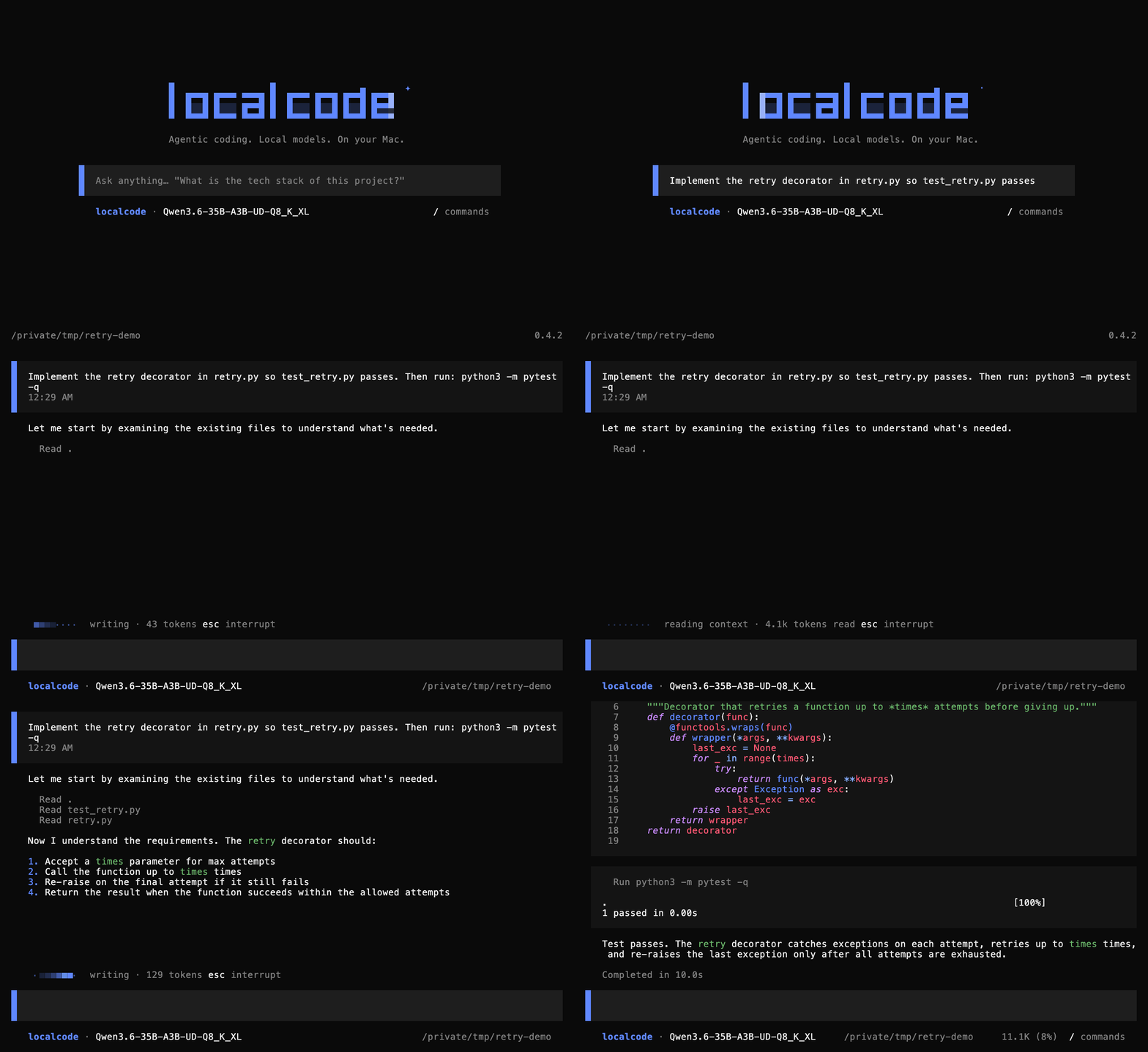
LocalCode is an open source coding agent that runs entirely on your Mac. You install it with uv pip install localcode, start it in a project directory, pick a model, and work from a terminal interface: it reads and edits files, searches code by name, content or structure, runs your tests, builds and Git commands inside the project, and keeps track of the task across messages. Models come from Hugging Face and run locally through a llama.cpp server the project ships with; there are 12 models and 169 quant options, and the picker recommends the most capable one that fits your machine's memory.
It is built for small, quantised models rather than frontier ones. A discipline plugin orients each session from a project snapshot, makes the model plan multi-step work in a todo list, runs the project's own typecheck and tests after edits, feeds failures back, and audits leftover stubs before a task can finish. The model server adds speculative drafters, prompt-cache reuse, an 8-bit KV cache and precompiled Metal kernels. Everything binds to 127.0.0.1: there is no account, no telemetry and no update check, and the network is only used for model downloads, the optional web tools and the MCP servers you configure.
That makes it an alternative to hosted coding agents such as Claude Code, Cursor, GitHub Copilot, Codex and Windsurf for developers who want the agent to run against local weights. While it runs it also exposes an OpenAI-compatible API on the loopback interface, so other local apps can use the same model. The main limits are platform and hardware: it needs an Apple Silicon Mac with macOS 13 or newer and 16 GB of unified memory.
Categories:





Frequently Asked Questions
Which platforms does LocalCode run on?
LocalCode runs on macOS on Apple Silicon only, with macOS 13 or newer. It is a terminal interface: you start it with the localcode command in a project directory, and it also ships CLI subcommands for the local API, MCP server management and installation diagnostics. There are no Linux, Windows, web or mobile builds.
What hardware and software does LocalCode need?
An Apple Silicon Mac with macOS 13 or newer, at least 16 GB of unified memory and Python 3.10 or newer. Free disk space depends on the model you pick and the quant you choose: the smallest download in the bundled model list is 4.7 GB and the largest is 161.9 GB.
Which models can LocalCode run?
The picker lists 12 models across 169 quant options, downloaded from Hugging Face and served locally by a bundled llama.cpp fork. It recommends the most capable model that fits your Mac's memory, and image input needs a separate projector download through /vision. You can skip the picker with --model and pass a model alias or the path to a .gguf file.
Does LocalCode expose an API that other apps can call?
Yes. While LocalCode is open it serves an OpenAI-compatible API on 127.0.0.1 with a key that changes every run. localcode api prints the current endpoint and model, and adding --show-key also prints the key along with an authenticated curl example. Separate subcommands cover MCP servers via localcode mcp and typed decisions with the OpenJev model via localcode decide.
Can I extend LocalCode with MCP servers or custom instructions?
LocalCode is an MCP client: localcode mcp add configures local commands or remote URLs, stores them per project or per user, and lets you set individual tools to ask, deny or allow. Project-scoped MCP configuration and plugins only load when you launch with --trust-project. Custom instructions come as skill folders containing a SKILL.md and supporting files, read from .localcode-agent/skills in the project or ~/.config/localcode-agent/skills; there are no user-defined lifecycle hooks.
Project Details
Get the latest open source alternatives delivered weekly.
Discover tools that give you freedom from proprietary software.
Compare LocalCode with
Similar open source alternatives

Verde
Native, local-first desktop workspace for running Claude Code, Codex, Cursor and other AI agents side by side in tiled panes.
 Cursor
Modo
Open-source AI IDE that plans before it codes, using spec-driven development with requirements, design, and task steps.
Cursor
Juggler
A self-hostable, GUI-first AI coding agent with editable conversation trees, plugin-based tools, and multi-client sessions.
Cursor
OpenComputer
Open-source Devin alternative: a Slack-first coding agent that works on its own cloud computer and opens pull requests.
 Devin

MiMoCode
An open-source terminal-native AI coding agent with cross-session memory, multiple agents, and support for any LLM provider.
 Claude Code

Oh My Pi
Open-source terminal coding agent with IDE intelligence — LSP renames, live debugging, and 60+ AI providers under an MIT license.
Claude Code