
Chop Chop Splitter
Frame-accurate video cutter and splitter for Ubuntu and Windows that re-encodes only a few frames per cut.
Open source alternative to:




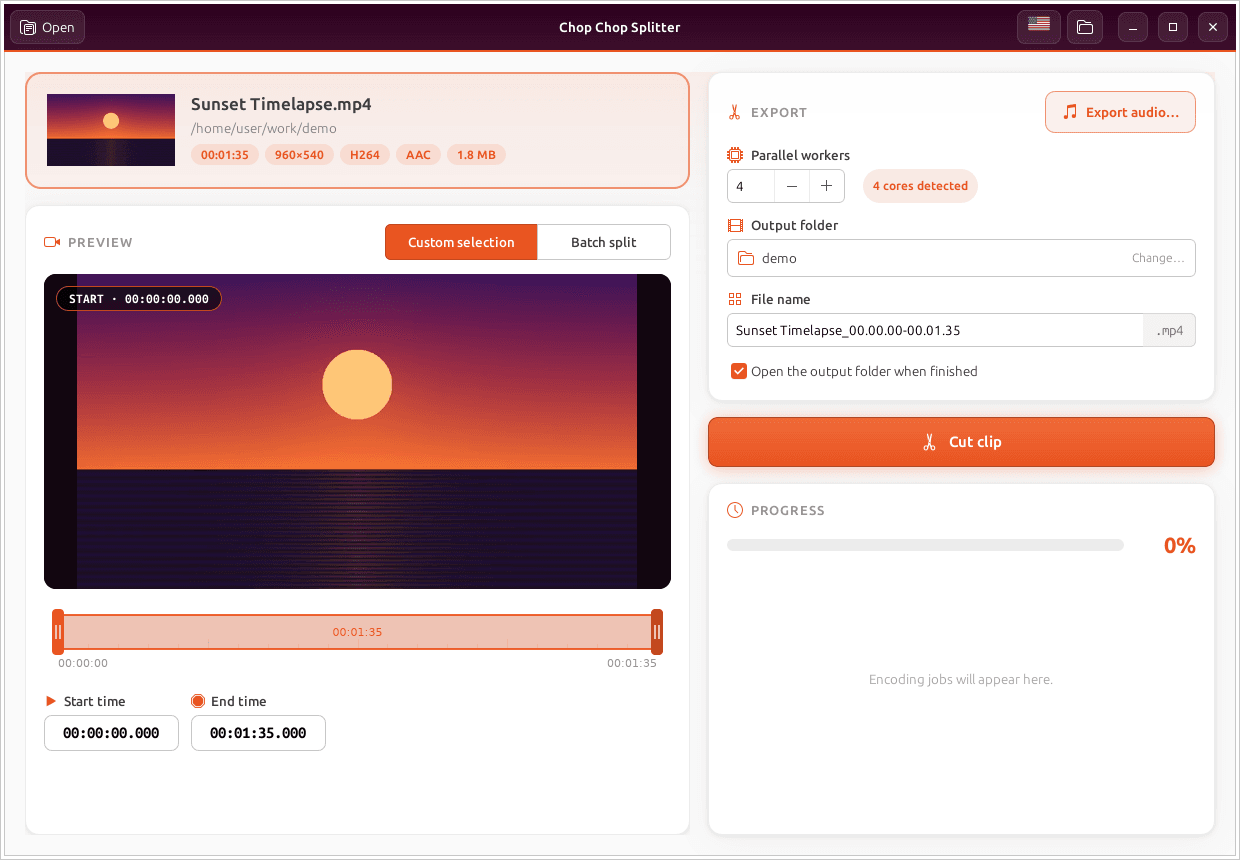
Chop Chop Splitter is a small, focused video cutter for people who just want to cut a clip out of a video or split a long recording into pieces — fast. You open a video, drag two handles on the timeline (or type exact times like HH:MM:SS.mmm), and press Cut clip, or switch to Batch split to divide the whole video every N minutes/seconds or into N equal parts. A live preview shows the exact start and end frame as you move.
Cuts are frame-accurate and almost lossless: FFmpeg re-encodes only the few frames between each cut and the nearest keyframe, keeping the source codec (H.264 or HEVC), profile and pixel format, while everything else is copied and joined without re-encoding — so no frame is duplicated or dropped and quality stays at the source level. Videos that cannot be cut this way (other codecs, open-GOP streams) fall back to re-encoding to H.264, on the GPU where available (NVIDIA NVENC, AMD AMF, Intel Quick Sync, or VA-API on Linux). Audio can be exported on its own as WAV, MP3, OGG, FLAC, M4A or Opus, one file per part in batch mode.
Where full commercial editors like Adobe Premiere Pro, Final Cut Pro or Filmora wrap cutting inside a heavy timeline with rendering, Chop Chop Splitter does one job — cutting and splitting — with no timeline, transitions or export settings. It is written in Rust, ships as a GTK 3 app on Ubuntu and a native Win32 app on Windows, is translated into English, Portuguese, Spanish and Greek, and is free and open source under the MIT license.
Categories:

Frequently Asked Questions
Which platforms does Chop Chop Splitter run on?
Chop Chop Splitter runs on Ubuntu 24.04 and 26.04 as a GTK 3 app installed from a .deb package (which also installs FFmpeg), and on Windows 10/11 64-bit as a native Win32 app from an NSIS installer that bundles FFmpeg. There are no macOS or mobile versions.
How can cuts be frame-accurate without re-encoding the whole video?
Only the frames between each cut point and the nearest keyframe are re-encoded, using the source's own codec (H.264 or HEVC), profile and pixel format. Everything else is copied and the pieces are joined without re-encoding, so cutting takes about as long as copying the file and no frames are duplicated or dropped.
What happens if my video cannot be cut losslessly?
Videos with codecs other than H.264 or HEVC, or with open-GOP streams, are re-encoded to H.264 instead. On machines with a supported GPU this happens in hardware — NVIDIA NVENC, AMD AMF, Intel Quick Sync, or VA-API on Linux.
Can I export the audio from a video?
Yes. In the save dialog you can pick WAV, MP3, OGG (Vorbis), FLAC, M4A (AAC) or Opus as the output format. In Batch split mode you get one audio file per part.
Which languages does the interface support?
The app is translated into English, Português, Español and Ελληνικά. On first launch it follows the system language, and you can switch anytime with the flag button; the choice is remembered.
OpenAltFinder Score
Project Details
Repository details
Updated 10/4/2026, 4:00:19 AM
View RepositoryCompare Chop Chop Splitter with
Similar open source alternatives

Shotcut
Cross-platform open-source video editor built on the MLT framework with a wide format support and no import required.
 Adobe Premiere Pro
OpenShot Video Editor
OpenShot is a free, open-source video editor for Linux, macOS, and Windows with unlimited tracks, keyframe animation, and 3D titles.
Adobe Premiere Pro
Drift
Free, open-source desktop video editor for Linux, Windows, and macOS built with Qt 6 and FFmpeg.
 CapCut
FableCut
FableCut is a zero-dependency, browser-based video editor designed for humans and AI agents. Drive edits via JSON timelines, the MCP protocol, or a clean REST API on any platform.
Adobe Premiere Pro
WolfCut
An open-source desktop video editor that mirrors the CapCut workflow without watermarks, paywalls, or account requirements.
CapCut
OBS Studio
OBS Studio is free and open source software for live streaming and screen recording. Capture, mix, and broadcast video with pro-grade tools used by streamers and creators worldwide.
 Camtasia